
On the biggest architectural leap Omnissa Access on-premises has ever made — and a toolkit that boils it down to a single command.

There are releases you install. And there are releases you have to understand before you install them. Omnissa Access 26.07 belongs firmly in the second category. On paper, it’s the successor to 24.12.x. In reality, it’s not an update — it’s a teardown and rebuild. The familiar virtual appliance, for years the foundation of every on-prem Access environment, disappears. In its place: a Control Plane of containerized microservices, spread across at least six virtual machines.
This article tells two stories. The first: why this overhaul was overdue and what it means technically. The second: how six documentation phases, three configuration files, and two hours of manual work became a single guided, idempotent command — aXs, a deployment toolkit that completed its first full end-to-end run on July 23, 2026. From six empty VM slots to a live, reachable tenant: 1 hour 43 minutes.
Released
aXs is released — free and open on GitHub, for everyone.
This article is the story behind it. For the hands-on walkthrough — configure, deploy, and reconfiguring a live cluster — see the step-by-step guide. Want a live walkthrough for your team? Reach me at stefan@solvig.ch.
Anyone who has operated the Access appliance for years knows the pattern. A monolithic thing that either ran or didn’t run — there was very little in between. Updates were a gamble. I’ve been through countless support calls where Omnissa engineering had to intervene directly just to get appliances onto a current version at all. For some older releases, new installers simply stopped shipping — the upgrade path dead-ended into nothing, and the only way forward ran through a ticket and an escalation.
This is precisely the era that 26.07 ends. The release notes put it dryly, but the sentence packs a punch:
The “single, self-contained virtual appliance” becomes “a set of containerized microservices that run on a Control Plane” — and the whole thing “aligns on-premises with Omnissa Access Cloud”.
Translated: on-prem gets the same architecture Omnissa runs in its own cloud. Services can be “updated, restarted, scaled, recovered individually”. The price is stated just as honestly in the release notes: “significantly higher infrastructure and resource requirements than previous appliance-based versions”. If you’ve been maintaining an appliance, you’ll be operating a platform from now on.
The Control Plane consists of three cleanly separated layers. At the bottom, the platform trio familiar from the HashiCorp world; above it, the infrastructure services; at the top, the actual Access applications.
| Layer | Components | Role |
|---|---|---|
| Platform Services | Nomad | Workload orchestration — runs all services |
| Consul | Service discovery and internal communication | |
| Vault | Secrets, certificates, tokens | |
| Infrastructure Services | PostgreSQL | Database |
| Redis | Cache and queues | |
| Kafka | Event streaming | |
| OpenSearch | Analytics | |
| Access Services | Omnissa Access services | The actual application services |
The topology to match: three infrastructure/platform nodes, two or more Access nodes behind a load balancer, plus a bootstrap node acting as deployment controller. That makes at least six VMs, seven for “large” — all on AlmaLinux 9.6, hypervisor ESXi 9.x. And everything is managed from one place: the bootstrap node, via the new wso CLI.
| Size | Access nodes | Users | Groups | Apps |
|---|---|---|---|---|
| Small | 2 (load-balanced) | up to 300,000 | 3,000 | 50 |
| Medium | 2 | up to 1,000,000 | 10,000 | 150 |
| Large | 3 | up to 1,000,000 | 20,000 | 500 |
And “significantly higher resource requirements” is not a figure of speech. Omnissa’s documented minimums, per node:
| Size | Bootstrap ×1 | Access node (each) | Platform node (each) |
|---|---|---|---|
| Small | 8 vCPU · 32 GB · 200 GB | 24 vCPU · 48 GB · 200 GB — ×2 | 16 vCPU · 48 GB · 200 GB — ×3 |
| Medium | 8 vCPU · 32 GB · 200 GB | 48 vCPU · 64 GB · 200 GB — ×2 | 24 vCPU · 96 GB · 300 GB — ×3 |
| Large | 8 vCPU · 32 GB · 200 GB | 64 vCPU · 96 GB · 200 GB — ×3 | 24 vCPU · 96 GB · 400 GB — ×3 |
Do the sum and even the small tier is sobering: across its six VMs it already asks for roughly 100 vCPU, 270 GB of RAM, and 1.2 TB of disk — where the old appliance was a single VM. This is the real cost line of the architecture, and it belongs on the whiteboard before anyone opens vCenter.
What the rebuild actually buys you boils down to four points. First, individual services instead of all-or-nothing — a misbehaving service gets redeployed surgically with wso services deploy -s <service-name>, without touching the platform. Second, defined scaling via small/medium/large. Third, lockstep with the Access Cloud. Fourth, multi-tenancy: it’s no accident that the deployment ends with wso access create-tenant — the first tenant is an explicit, dedicated final step.
And day-to-day administration? Remains surprisingly familiar. The admin console is largely unchanged, connectors are activated as before, Hub Services are still on board. The overhaul happens under the hood, not at the surface.
26.07 is available exclusively as a fresh installation. Upgrading from earlier appliance versions is not supported — Omnissa recommends the side-by-side migration: build 26.07 alongside your existing 24.12.x, then migrate.
That’s the one consequence nobody gets around: every existing environment will be fully redeployed exactly once. And that is exactly why it pays to take the deployment itself seriously — more on that in a moment.
The cloud alignment isn’t architectural poetry — it’s a feature catalog. With 26.07, formerly cloud-exclusive capabilities land on-premises:
Deprecated in return: the built-in KDC for Mobile SSO iOS; its successor is Mobile SSO for Apple. And frankly — good riddance. I’ve had countless customers give up on the old Mobile SSO for iOS stack over the years: the built-in KDC brought port and reachability requirements that sank more than one rollout before a single device was enrolled. Its successor drops that baggage; Omnissa documents the migration path and the differences between the two methods.
Which makes the business case crystal clear: if you need FIDO2 or Entra federation on-prem, you get them exclusively through the new platform. There is no second route.
Omnissa documents the deployment in six official phases:
Sounds tidy. Behind it lies the actual handwork: roll out OVAs for six or more VMs, provision the bootstrap with the asset bundle, wso access init, fill the cp-cluster.ini with the role mapping of every node, set up SSH trust, wso cp deploy — 30 to 60 minutes. Then edit the access-profile.yml with tenant, certificate, and load balancer, wso services deploy — roughly 40 minutes. Finally, create the tenant.
The real problem isn’t the steps. The problem is that long steps fail late. A cert/FQDN mismatch only surfaces deep inside the 40-minute service deploy. A wrong netmask makes ovftool abort 20 minutes in. A typo in the cp-cluster.ini costs an hour.
Anyone who has to walk this gauntlet once for every existing environment — and thanks to the missing upgrade path, everyone does — wants exactly one thing: for mistakes to surface where they’re made. At the keyboard. Not 40 minutes later in a log.
aXs translates the six documentation phases into nine phases of its own, with an explicit dependency graph:
00_preflight
  ├─→ 10_vms
  │     └─→ 20_nodes_ready
  │           └─→ 40_bootstrap
  │                 └─→ 50_cluster_init
  │                       └─→ 60_platform ──┐
  └─→ 30_lb ────────────────────────────────┤
                                            ▼
                                  70_services → 80_tenant
The graph is not decoration. 30_lb depends only on the preflight and runs in parallel with the VM rollout — the load balancer gets configured while the nodes are still booting. 70_services waits for both. Where the documentation describes a chain, aXs reasons in a graph.
What you need
wso images the bootstrap unpacks).Before the first deploy comes axs configure — and it replaces the part of the documentation that normally means hand-editing three files. Instead of a blank config.yml, a cp-cluster.ini, and an access-profile.yml, the TUI walks through three pages and writes one validated cluster configuration at the end. Every field carries its help text right where you type — the form is the documentation.
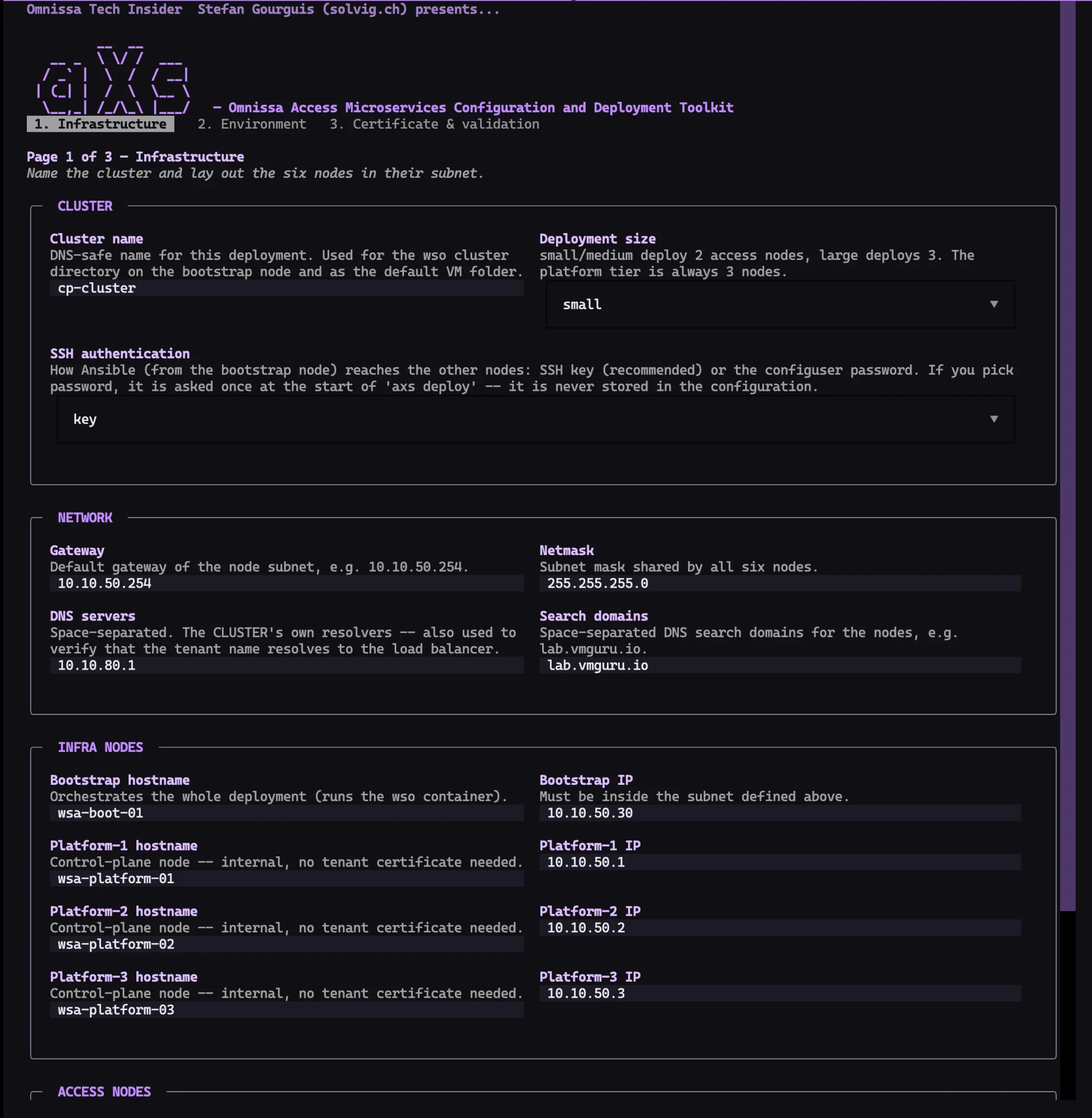
Page 1 — Infrastructure. Cluster name and deployment size (small/medium/large — the platform tier is always three nodes), SSH authentication for Ansible — key recommended; if you pick password, it is asked once at the start of a deploy and never stored — then the node subnet with gateway, netmask, and, crucially, the cluster’s own DNS resolvers and search domains. Below that, all six nodes with hostname and IP: bootstrap, three platform nodes, the Access nodes.
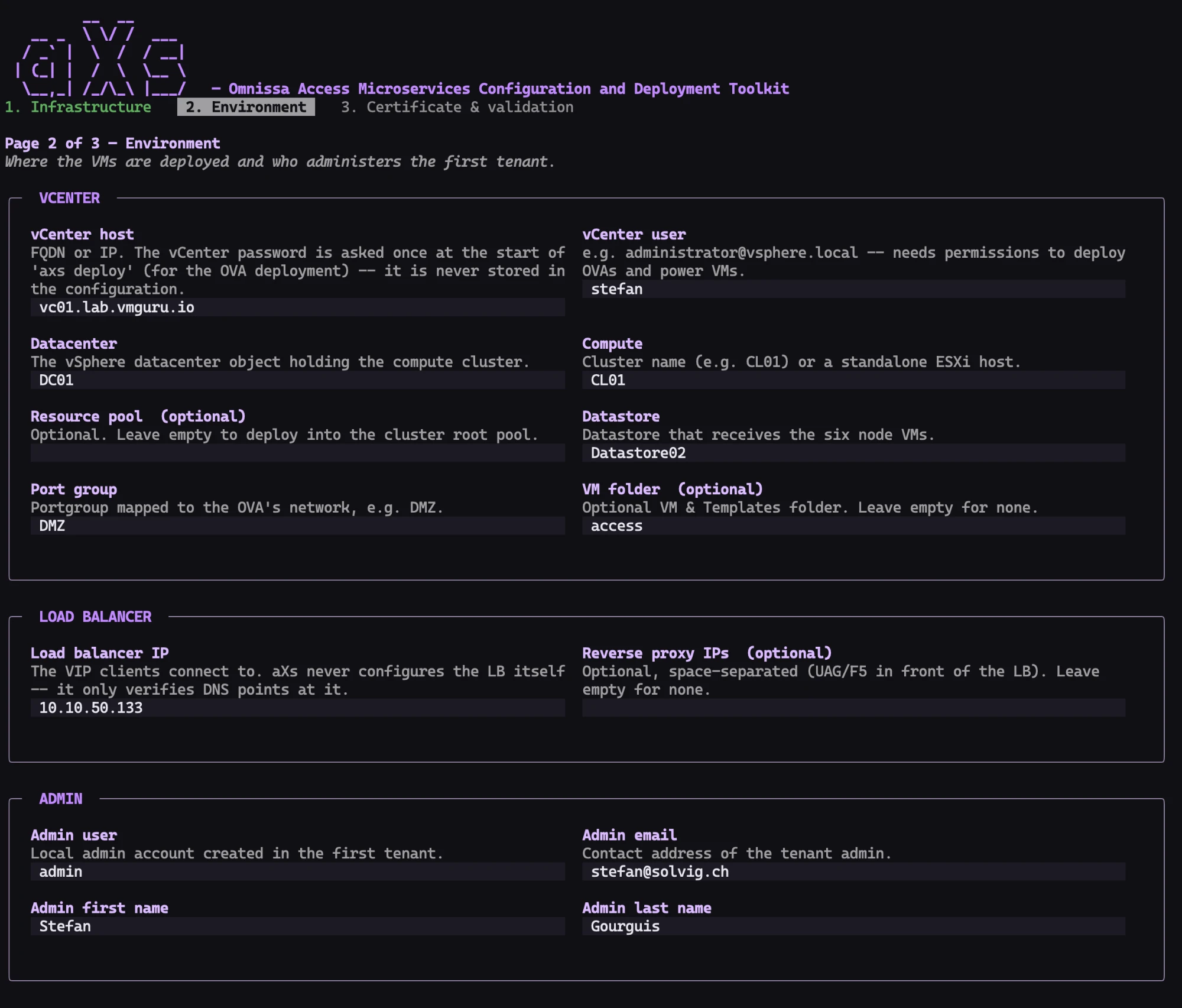
Page 2 — Environment. Where the VMs land and who administers the first tenant: vCenter host, user, datacenter, compute cluster, datastore, port group — resource pool and VM folder optional. Then the load balancer VIP. Today, aXs supports external load balancers only — it never configures the LB itself, but it does verify it: DNS has to point at the VIP before a deploy gets off the ground. A future version will go further and offer managed load balancing via HAProxy plus a reverse proxy, along the lines the Omnissa documentation already sketches.
Which leads to a thought that has been nagging me since the release: why didn’t Omnissa anchor load balancing directly in the microservices stack? The Control Plane already ships Nomad, Consul, and a service mesh’s worth of infrastructure — an ingress tier would be the natural next tenant of that platform. Requiring an external LB for an otherwise self-contained architecture feels like the one piece of the appliance era that survived the teardown. My bet: a future release folds it in.
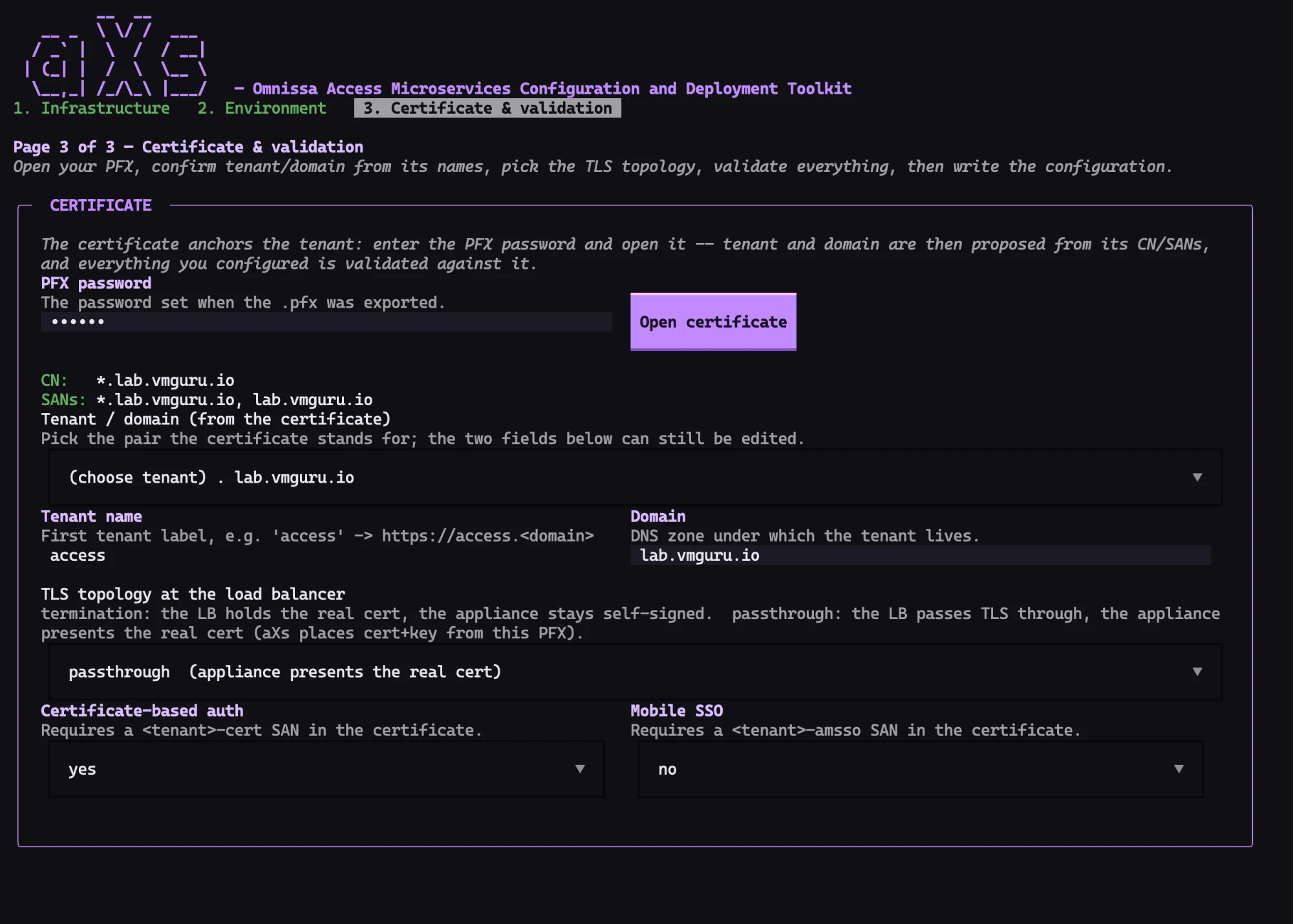
Page 3 — Certificate & validation. The certificate-as-anchor principle starts here: enter the PFX password, open the certificate — CN and SANs appear on screen, and tenant and domain are proposed directly from them. Pick the TLS topology at the load balancer — termination (the LB holds the real cert) or passthrough (the appliance presents it; aXs places cert and key from this PFX). Certificate-based auth and Mobile SSO state, right at the dropdown, which SAN each of them requires. Then everything you configured is validated against the certificate and the network — and only then is the configuration written.
The core principle: every mistake that would surface 40 minutes later is caught as you type — before the first ovftool invocation. aXs checks whether the IP sits in the right subnet, whether DNS resolves forward and reverse, whether the vCenter objects actually exist, whether the ovftool version fits, whether the OVA descriptor is sound.
One detail on-prem practitioners will recognize instantly: split-horizon DNS. aXs validates DNS against the DNS servers from the cluster config — not against the resolver on the admin’s laptop. In on-prem environments, split-horizon is the rule rather than the exception; what matters is what the nodes resolve, not what the laptop believes. So aXs queries exactly the resolvers the nodes will use.
The most classic of all Access deployment failures is a certificate failure. aXs turns the tables and makes the certificate the source of truth:
-legacy fallback for older Windows CAs. Omnissa gets separate files, HAProxy the concatenated version. The PFX passphrase goes to openssl via stdin, never on the command line.access.access.domain.tld — tenant and domain swapped, and half the configuration points into the void.-cert / -amsso helper names on top. A single *.domain wildcard covers them all in one go; but if you run a certificate without a wildcard — one explicit SAN per host, as plenty of security teams insist on — aXs checks that every required name is actually present and names the ones that aren’t. The cert mismatch that used to explode 40 minutes deep in the service deploy is caught before the first VM boots.cp-cluster.ini has to use the container path /workdir/private-key/… — wso bind-mounts the cluster directory as /workdir inside its deploy container (proven via docker inspect; the host path the documentation shows simply never works). The access profile, in turn, wants the certificate at the host path /root/<cluster>/access/certs/. aXs stages both automatically and writes the right convention into each file.Completed phases are skipped because the system says they’re complete — not because an exit code claims so.
Every phase has an is_done() probe that interrogates the real system state — via SSH, healthcheck, or HTTP. No state file that can lie. If the deployment breaks off — network drops, Ctrl-C, end of the workday — you rerun the same command, and aXs picks up exactly where it left off.
The probes are strict: the bootstrap phase only counts as “done” once wso version reports both image versions (CP and CPS). An image load that got interrupted in the middle of wso configure is cleanly redone rather than falsely waved through as finished.
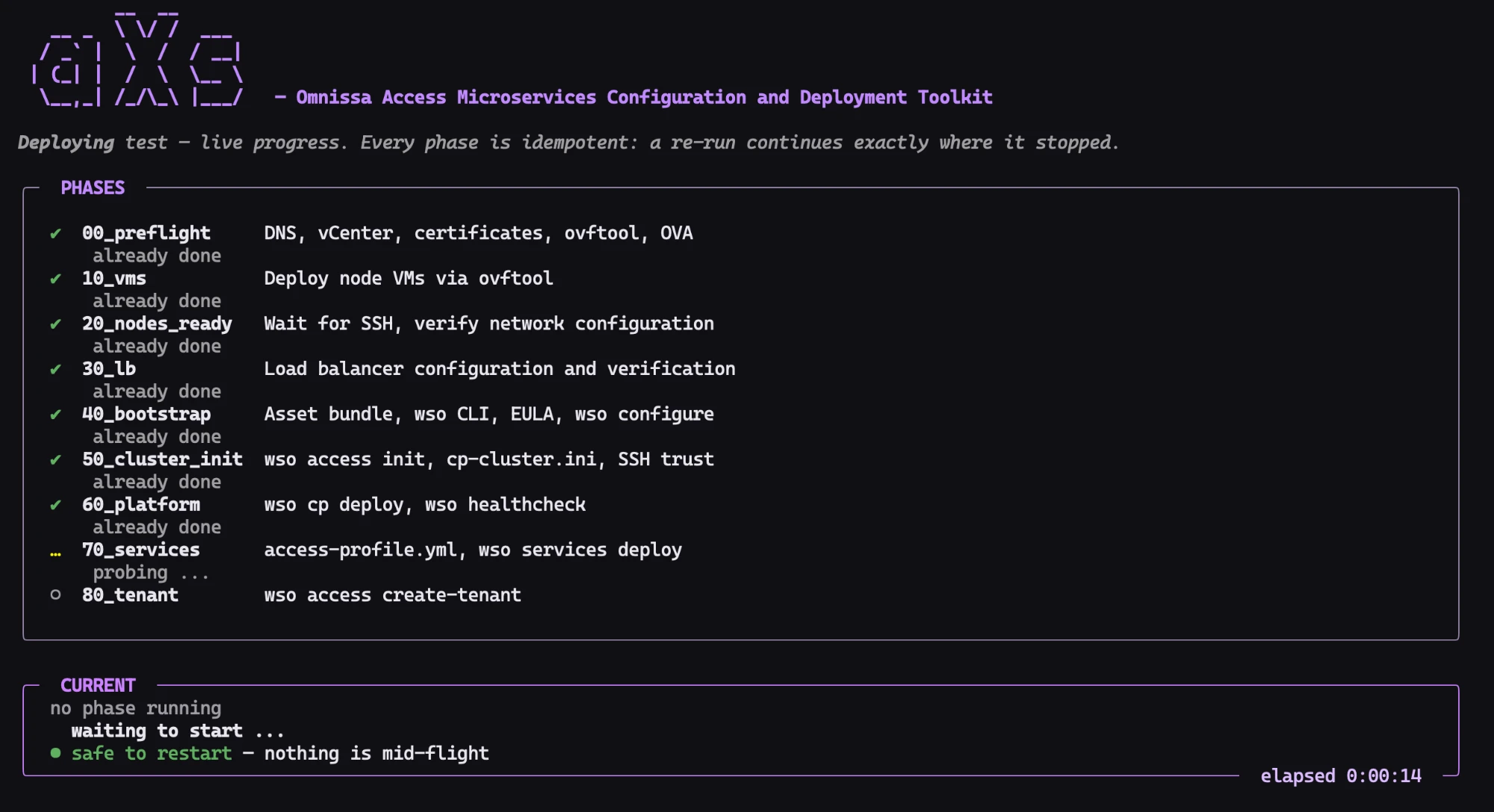
And the long runners? aXs launches wso cp deploy and wso services deploy detached on the bootstrap. If the connection drops, the deploy simply keeps running — on the next invocation, aXs reattaches to the same log as if nothing had happened.
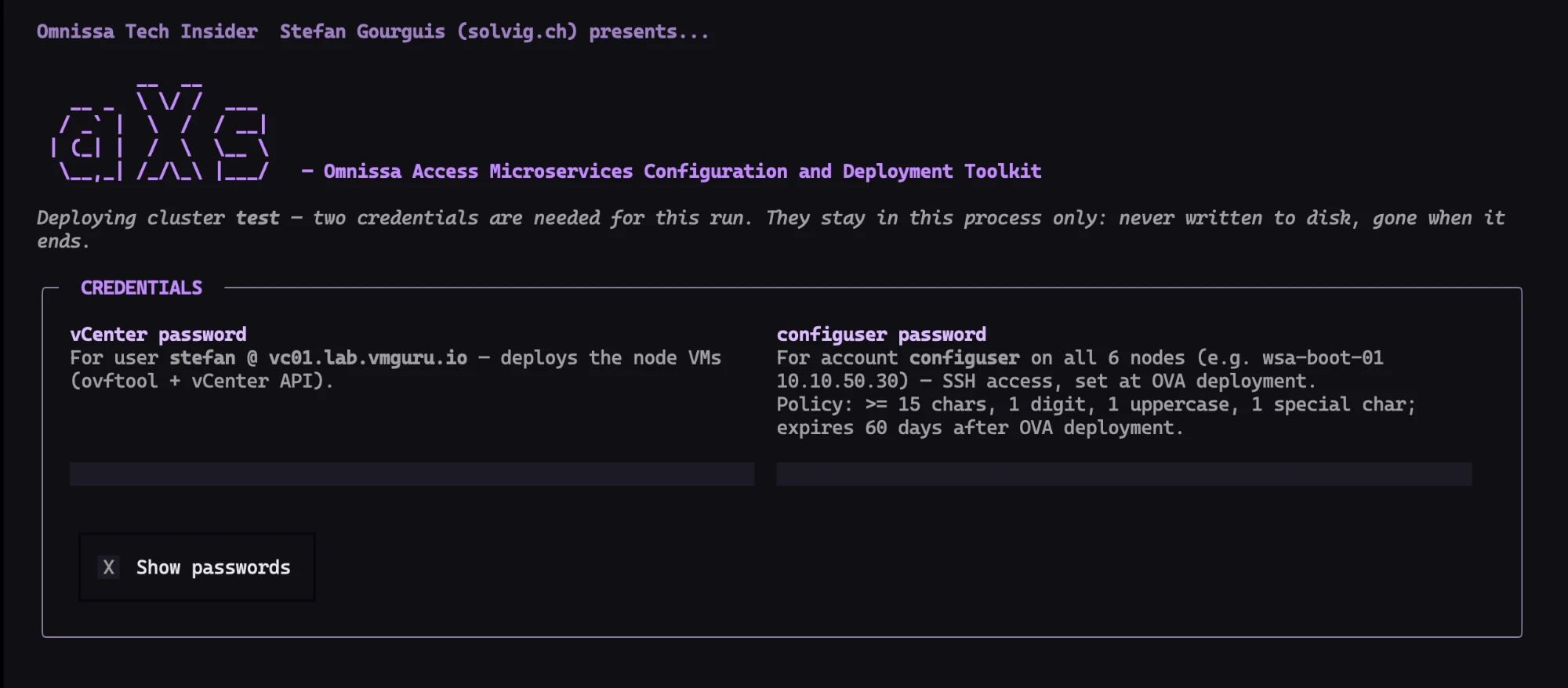
No secret ends up in the config.yml, nothing is persisted, and environment variables are deliberately not accepted as a password source — passwords arrive exclusively interactively at runtime. When a deploy starts, the splash screen hands over to exactly one credentials prompt: vCenter and configuser, once per run. The configuser policy shown next to the field — 15 characters minimum, digit, uppercase, special character, 60-day expiry — isn’t hardcoded either: it comes straight from the OVA profile, and the screen checks it per keystroke. Secrets are masked in both console and log file before anything is ever written. PFX and SSH passwords travel via stdin instead of argv.
The error handling in aXs doesn’t come from gut feeling but from an adversarial design review — a second, independent agent run that deliberately attacks the assumptions of the first. Verified against the lab. Four examples:
wso access check-service-readiness — every one of the roughly 20 Access core services must be present and READY; a missing service is a failure, not “not checked” — and wso healthcheck -f json: Vault, Consul, and Nomad reachable, every member healthy, Vault not sealed. Both outputs are parsed as JSON.logging, telegraf, and monitoring are tolerable — the documentation calls logging targets optional. But it’s an allowlist, never the complement: backup, ingress, and db stay critical, because data path and data safety are non-negotiable. This exact point came out of the adversarial review.wso services deploy fails, aXs automatically repeats the hash-idempotent deploy. But if the same service hangs twice in a row, aXs aborts early instead of burning three times 40 minutes — with documented remediation: wso services deploy -s <service>.sealed in the healthcheck JSON and runs wso cp unseal exactly once.And one more interceptor right at the start: a wrong configuser password would make every node probe fail — 20 minutes of waiting for nodes that will never become ready, with faillock risk on top. So aXs verifies the password immediately with a quick check against the bootstrap. On “Permission denied”: a clean abort with a Back button in the TUI, before anything has been changed. And crucially: a network error is not a password error — only a genuine “Permission denied” aborts.
aXs is a Textual-based TUI with its own purple theme (ws1purple), complete with an ASCII-art axe splash that adapts to terminal height. But the real value lies in three elements:
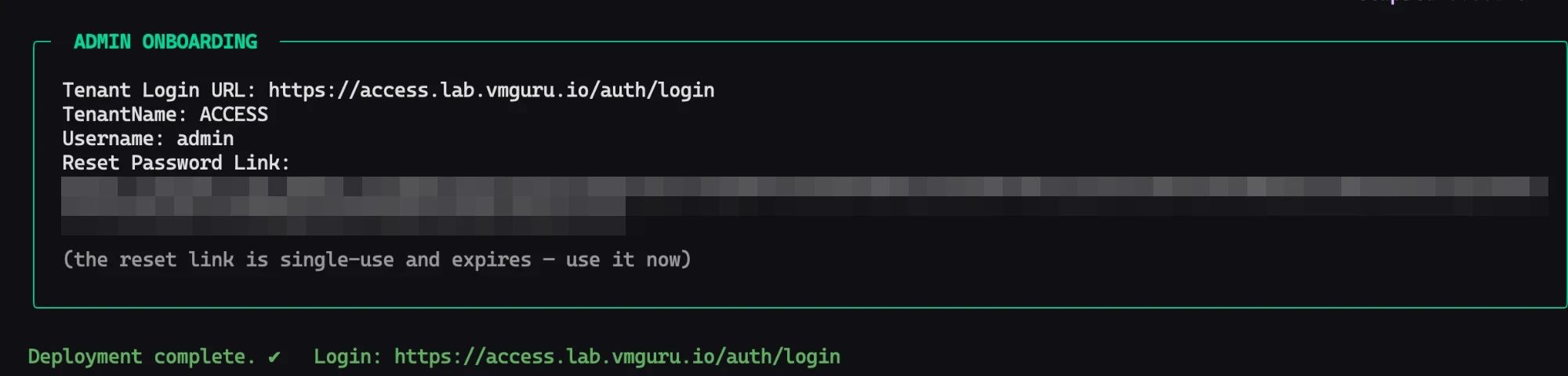
+/-, including readably formatted Ansible tasks and ovftool percentage progress. Cleaned-up is literal: aXs surfaces the current Ansible TASK/PLAY line out of the log noise and drops the timing chatter.At the end waits the admin onboarding block: aXs extracts the tenant login URL, the admin username, and the reset-password link — the only way to set the first admin password — from the create-tenant log and displays it all prominently. The single-use reset token is deliberately never mirrored into the deploy log.
And because on-prem often also means locked-down: aXs is airgap-ready — pure Python with no compiled dependencies, offline installation from the bundled wheelhouse, runs on macOS and Linux.
On July 23, 2026, the first complete aXs deploy from scratch ran through — from six empty VM slots in vCenter to a live, reachable tenant, phases 00 through 80, uninterrupted, in 1 hour 43 minutes.
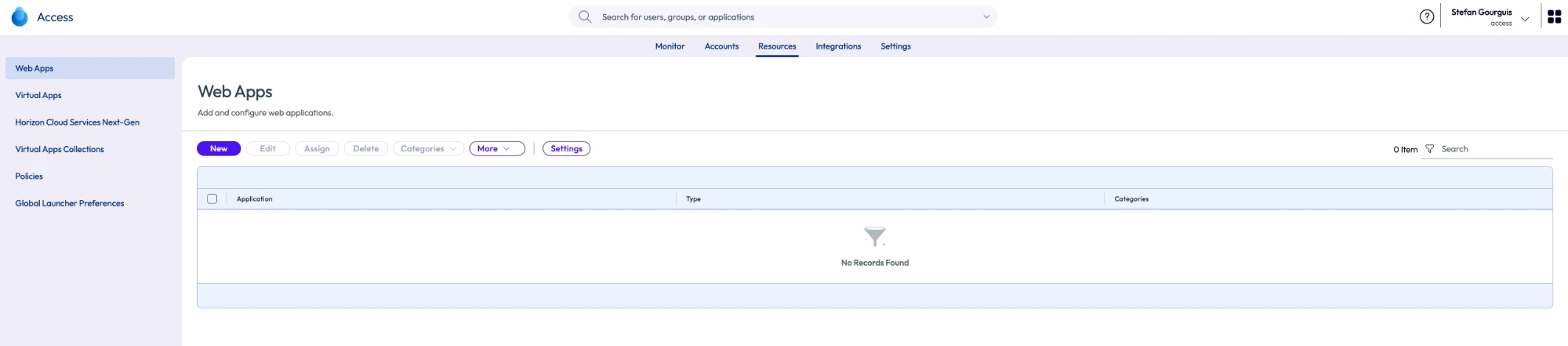
Honesty is part of the story: it was the first uninterrupted run precisely because real pitfalls were found and fixed along the way. Three of them are worth telling:
pgrep -f 'wso cp deploy' found — itself. The search string sat in the command line of the probing shell, aXs concluded the deploy was “already running” and never started it. Fix: the classic [w]so character-class idiom. Verified in the lab: buggy rc=0, fixed rc=1.wso access bootstrap aborted with Certificate file does not exist: /workdir/access/certs/appliance.crt — the profile carried a local path, and the cert had never been staged. Today, aXs stages cert and key automatically to /root/<cluster>/access/certs/ and rewrites the profile paths.wso services deploy aborted midway (wrong password, retries) left behind Nomad deployment state that blocked subsequent deploys — even though the containers were running healthy. Today, the password interceptor, the “safe to restart” indicator, and the auto-retry catch exactly this scenario.The uninterrupted 1-hour-43-minute run delivered the forensic confirmation as a byproduct: the earlier “host-logging failed” aborts were the mangled Nomad state — not the deployment topology.
Beyond the run itself, aXs has absorbed the kind of environment knowledge that only comes from real deployments — the small gaps between what the documentation says and what the platform actually does, each of which would otherwise cost an afternoon. That knowledge is baked into the preflight checks and version requirements, so you never meet it the hard way. And for the day something jams anyway, axs status compares the environment against the target state and tells you exactly where you stand — while errors come back explained, with likely causes and next steps, instead of as stack traces. When “it doesn’t work”, support sees the state instead of a story.
| Appliance era (through 24.12.x) | Control Plane (from 26.07) | |
|---|---|---|
| Architecture | ”single, self-contained virtual appliance" | "containerized microservices that run on a Control Plane” |
| Updates | All-or-nothing; sometimes only via support escalation | Services updated, restarted, scaled, recovered individually |
| Scaling | — | Defined: small / medium / large, up to 1 million users |
| Tenants | — | Multi-tenancy, first tenant via wso access create-tenant |
| Feature parity | Behind the cloud | ”aligns on-premises with Omnissa Access Cloud”: FIDO2, Platform SSO, DUO, SIEM, Entra/Okta federation |
| Footprint | One VM | At least 6 VMs (7 for large), “significantly higher infrastructure and resource requirements” |
| How to get there | — | Fresh installation only, side-by-side migration; with aXs: one command, 00→80 |
Access 26.07 is the architectural leap on-prem operators have been waiting for. Gone is the appliance that could only be kept current with engineering support. In its place: a Control Plane of containerized microservices — individually updatable, scalable by design up to one million users, multi-tenant capable, in lockstep with the Access Cloud, including FIDO2, Platform SSO, DUO, SIEM integration, and Entra/Okta federation.
The price is one-time and unavoidable: there is no upgrade path, and every environment gets rebuilt side by side. That is exactly where aXs comes in — turning the mandatory exercise into a guided, idempotent, resumable command.
From OVA to tenant in under two hours.
If 26.07 is on your roadmap and you’d rather not turn the rebuild into an adventure: get in touch — solvig.ch.
And if you’d like to see aXs in action: I’m happy to walk through the whole deployment live — one-on-one or as a webinar — and explain the reasoning behind each phase. Just drop me a line at stefan@solvig.ch.
aXs is on GitHub now, free for everyone: github.com/vmmachina/aXs — with a step-by-step guide to match. Follow along at solvig.ch.
Stefan Gourguis · Omnissa Tech Insider · solvig.ch