

At solvig., my work as a consultant and architect takes me into many Horizon and Workspace ONE environments. I keep looking for small improvements to the Omnissa products I work with. Some ideas start with an architectural question. This one started with one click too many.
I wanted to keep an eye on the connection details in Horizon’s original Blast tray tool. Open the icon, check the values, get back to work. Then do it again. What if those details lived directly on the desktop, a little like BGInfo?
Ladies and gentlemen, meet Blast Pulse.
The starting point was the original dialog: video codec, screen capture method, display device, screen configuration, transport, and Horizon connection quality. Blast Pulse brings those six details together with Blast FPS, round-trip time (RTT), and uplink packet loss.
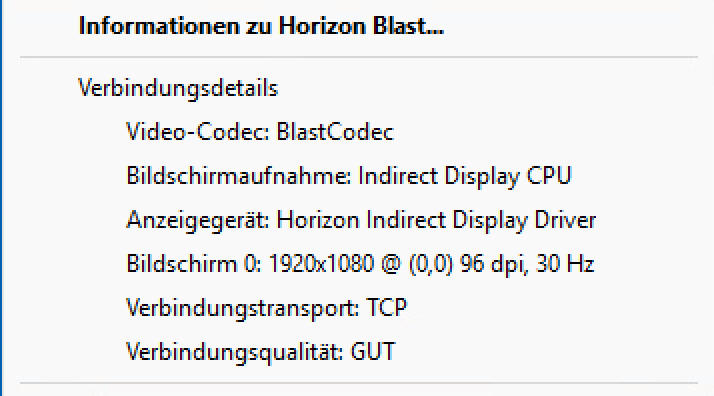
A large information box felt too heavy, and a static background did not fit changing values. The result is a compact, transparent display at the bottom right of the primary desktop, below normal application windows. It does not rewrite the wallpaper for every update. BGInfo can stay, too; configurable spacing leaves room for it.
For admins, consultants, and helpdesk colleagues, the appeal is simple: less interruption when checking a session, and concrete observations when a user says, “The desktop feels slow.”
Blast Pulse reads local, session-matched Horizon WMI performance counters and the session’s Blast-Worker log, alongside Windows display information. It needs no separate credentials and uploads no readings to an external service.
Counter polling defaults to one second; log and display reads to five seconds. Codec, capture method, transport, and Horizon quality come from matching log entries. Quality and transport reflect the latest matching quality entry, not necessarily the current moment: its timestamp is shown, quality older than 90 seconds is marked, and missing quality/transport show “Not reported.” Blast Pulse does not force the original tray tool to refresh or invent a Horizon quality rating.
About Blast FPS
Blast FPS describes desktop transmission, not a source video's playback frame rate. Even the updating display can generate frames.
Run BlastPulse.exe inside an active Horizon Blast session. An adjacent config.json is optional and lets you adjust width, font, spacing, and refresh intervals. The display adapts to resolution and Windows scaling changes while it runs; editing config.json still requires a restart. The tray menu offers hide/show, exit, and English/German language selection, remembered per Windows user.
You can start Blast Pulse from a local folder or shared path through a user logon script, alongside an existing BGInfo launch. It installs no service or autostart itself; test central deployment in your environment.
My initial hands-on testing was on Windows 11 with Horizon Agent 2606. The documented requirements are Windows 10/11 x64 and .NET Framework 4.8, with readable counters and logs. The executable is unsigned. Multiple monitors, Explorer restarts, and reconnects have not been comprehensively validated; available data depends on Agent version, log format, and permissions.
Get Blast Pulse from the GitHub project page, where you’ll find the latest downloads, configuration examples, and English/German documentation.
Have an idea or an improvement for Blast Pulse? Get in touch by email at stefan@solvig.ch or on LinkedIn. I would love to hear what would make it more useful in your environment.
19 October 2026
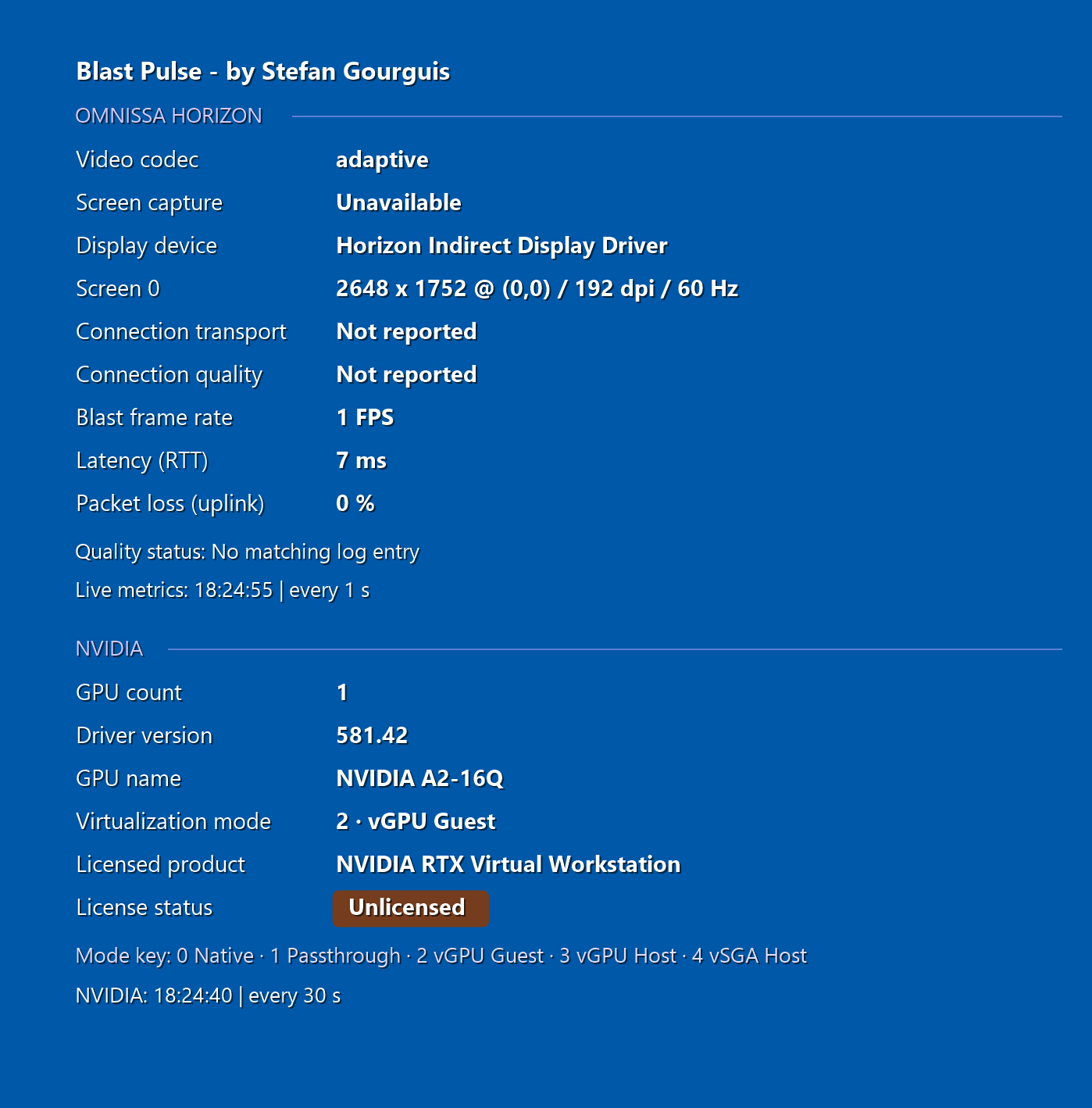
The new NVIDIA section puts GPU and licensing information beside the Horizon connection details: GPU count visible to the Windows guest, GPU name, virtualization mode, driver version, licensed product, and license status.
It reads the installed NVIDIA driver locally through NVML. NVIDIA information refreshes every 30 seconds, independently of the live Blast counters. The license badge reflects the guest driver’s report; it does not verify a current connection to NVIDIA DLS. Unavailable queries or samples older than 90 seconds show Unknown.
The latest version and documentation are available on the GitHub project page.